More examples
Generating the oriented unitig graph
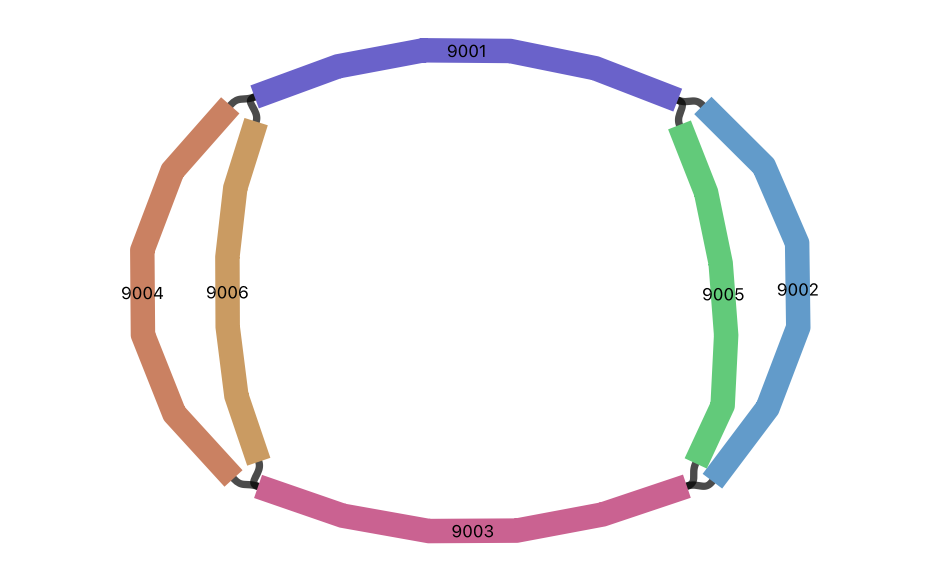
Let's consider the following example unitig graph.
H   VN:Z:1.0
S   9001    AAATTTCCCGGGAAATTTCC
S   9002    CCCGGGAAATTTCCCGGGAA
S   9003    GGAAATTTCCCGGGAAATTT
S   9004    TTCCCGGGAAATTTCCCGGG
S   9005    CCCGGGAAACCTCCCGGGAA
S   9006    TTCCCGGGAGGTTTCCCGGG
L   9001    +   9002    +   3M
L   9002    +   9003    +   3M
L   9001    +   9005    +   3M
L   9005    +   9003    +   3M
L   9003    +   9004    +   3M
L   9004    +   9001    +   3M
L   9003    +   9006    +   3M
L   9006    +   9001    +   3M
If you visualise the graph using Bandage, it will look as follows.
We can generate the oriented unitig graph as follows.
import igraph as ig

from agtools.core.unitig_graph import UnitigGraph
from bidict import bidict

# Load the assembly graph
ug = UnitigGraph.from_gfa("unitig_graph.gfa")

# Get forward node (+) and reverse node (-) for each contig
oriented_nodes = bidict()
i = 0
for segment in ug.segment_names:
    oriented_nodes[f"{segment}+"] = i
    oriented_nodes[f"{segment}-"] = i + 1
    i += 2

# Get total node count
# Each segment has a forward node (+) and reverse node (-)
node_count = len(oriented_nodes)

# Create the directed igraph.Graph object
directed_ug = graph = ig.Graph(directed=True)
directed_ug.add_vertices(node_count)

# Name segments
oriented_nodes_rev = oriented_nodes.inverse
for i in range(node_count):
    directed_ug.vs[i]["id"] = i
    directed_ug.vs[i]["name"] = oriented_nodes_rev[i]

# Get oriented edges
edge_list = []
for from_link in ug.oriented_links:
    for to_link in ug.oriented_links[from_link]:
        for orient in ug.oriented_links[from_link][to_link]:
            source = f"{ug.segment_names[from_link]}{orient[0]}"
            target = f"{ug.segment_names[to_link]}{orient[1]}"
            edge_list.append((source, target))

# Add oriented edges to the graph
directed_ug.add_edges(edge_list)

# Plot the graph using igraph
ig.plot(
    directed_ug,                            # graph object
    "directed_graph_plot.png",              # file name
    vertex_label=directed_ug.vs["name"],    # label names
    vertex_size=60,                         # vertex size
    vertex_frame_width=2.0,                 # vertex frame width
    vertex_label_size=20.0,                 # vertex label size
    margin=40,                              # margin size
)
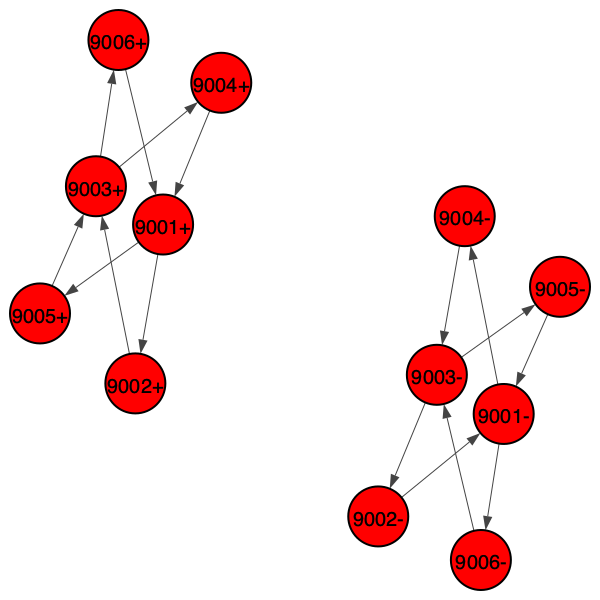
The plotted graph is shown below. You can see that each segment is represented by two nodes: the forward node (+) and the reverse node (-). The connections are directed as well.
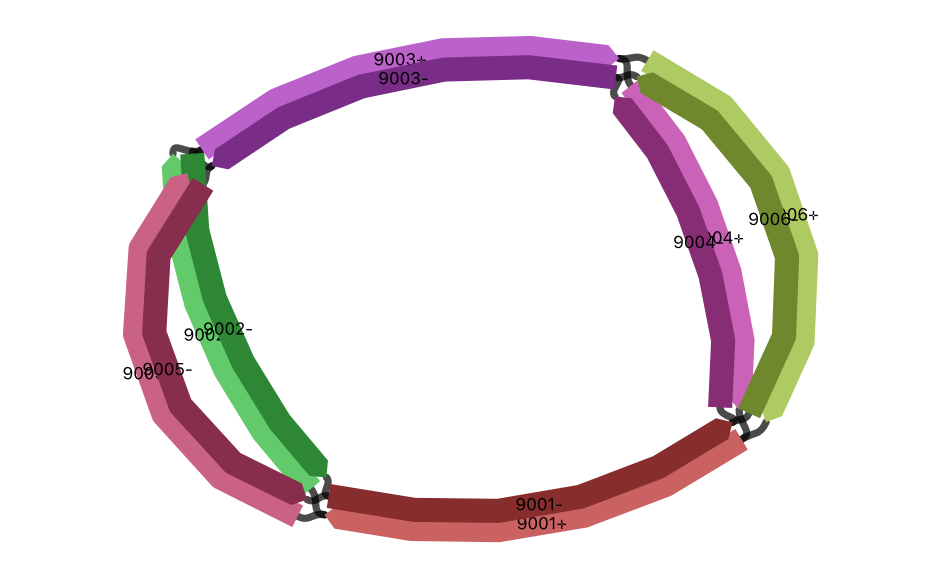
This is similar to how Bandage visualises the graph using the Double style.
Finding the shortest path between two segments
You can get the shortest path between two segments in the oriented unitig graph as follows.
>>> directed_ug.get_shortest_paths(oriented_nodes["9001+"], to=oriented_nodes["9003+"])
[[0, 2, 4]]
Finding all simple cycles
You can find all simple cycles in the oriented unitig graph as follows. A simple cycle is a path that starts and ends at the same vertex, and does not repeat any other vertices or edges.
>>> cycles = directed_ug.simple_cycles()
>>> cycles
[(0, 2, 4, 6), (0, 2, 4, 10), (0, 8, 4, 6), (0, 8, 4, 10), (1, 7, 5, 3), (1, 7, 5, 9), (1, 11, 5, 3), (1, 11, 5, 9)]
You can print the paths using the corresponding segment names as follows.
>>> for cycle in cycles:
...     for node in cycle:
...         print(oriented_nodes_rev[node], end=" ")
...     print()
...
9001+ 9002+ 9003+ 9004+
9001+ 9002+ 9003+ 9006+
9001+ 9005+ 9003+ 9004+
9001+ 9005+ 9003+ 9006+
9001- 9004- 9003- 9002-
9001- 9004- 9003- 9005-
9001- 9006- 9003- 9002-
9001- 9006- 9003- 9005-
Tip
Please refer to the python-igraph documentation for more details on how to manipulate the graph.